Modern AI and data science applications are changing the game for IT teams. Unlike traditional enterprise systems, these workloads often rely on GPU acceleration, high-speed networking, and cloud-native architectures. Managing this complexity can be overwhelming—but NVIDIA offers a suite of tools to make it easier.
Challenges in Managing Modern AI Workloads
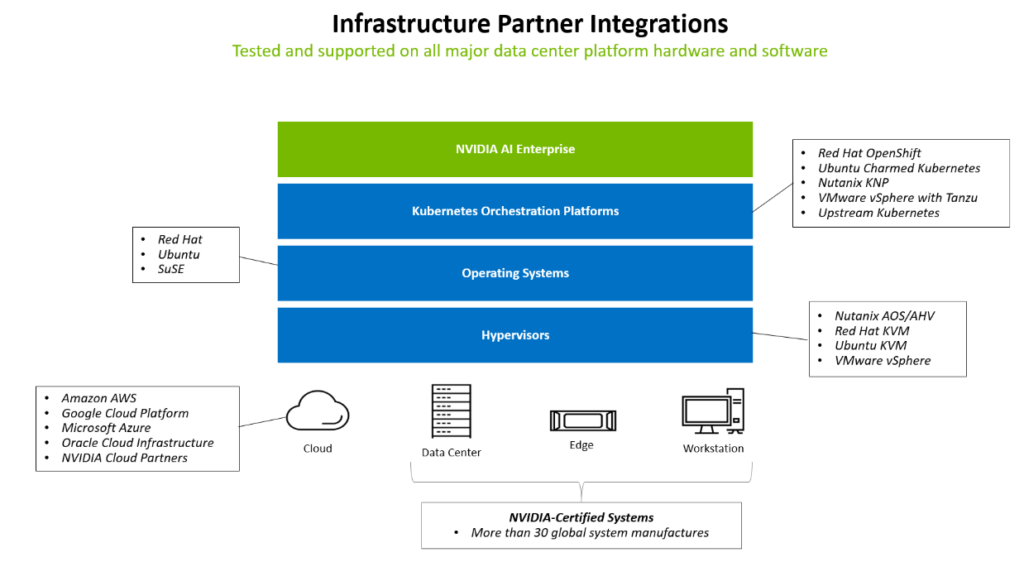
Today’s applications are built on microservices and run in containers, often orchestrated by Kubernetes. IT admins must:
IT teams now handle complex, container-based AI and data science workloads, unlike traditional monolithic systems.
Infrastructure involves GPU acceleration, high-speed networking, and cloud-native architectures with microservices.
Admins must provide specialized software stacks, drivers, and Kubernetes (K8s) operators for different AI workflows.
This requires more than just hardware—it demands smart software solutions.
NVIDIA’s Solution: A Complete Software Stack
NVIDIA provides a layered approach to simplify infrastructure management:
1. Core Drivers
These drivers unlock GPU and networking performance:
GPU Data Center Driver – Optimizes GPUs for AI and HPC workloads.
DOCA Networking Driver – Enables high-speed networking with GPU Direct RDMA.
vGPU Drivers – Allow multiple virtual machines to share a single GPU without losing performance.
2. Container & Kubernetes Integration
Modern workloads often run in containers. NVIDIA offers:
NVIDIA Container Toolkit – Enables GPU acceleration in Docker/Podman containers.
Kubernetes Operators – Automate GPU and networking setup across clusters. Key operators include:
GPU Operator – Manages GPU lifecycle and performance.
NIM Operator – Deploys generative AI microservices seamlessly.
3. Base Command Manager (BCM)
BCM is NVIDIA’s infrastructure management tool. It:
Automates server provisioning and OS imaging.
Configures networking, security, and GPU settings.
Monitors health and performance with hundreds of metrics.
Extends clusters to the cloud for hybrid flexibility.
Provides workload orchestration with Kubernetes and Slurm.
Offers chargeback reporting for resource usage.
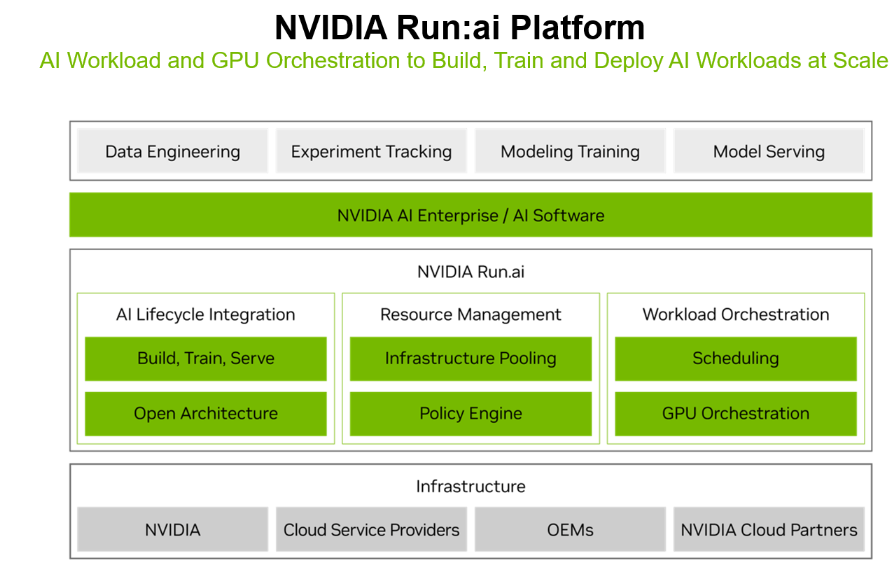
4. Run:ai Platform
Run:ai adds an orchestration layer for AI workloads:
AI Lifecycle Integration – Supports build, train, and deploy phases.
Resource Management – Pools GPUs for efficiency.
Workload Scheduling – Ensures the right jobs run on the right resources.
Run:ai works across on-prem, hybrid, and cloud environments, giving IT teams visibility and control while speeding up AI development.
Why This Matters
By combining these tools, IT teams can:
Reduce complexity in managing AI infrastructure.
Improve resource utilization and performance.
Enable data scientists to focus on innovation, not infrastructure.
Key Takeaways
Modern AI workloads demand specialized infrastructure and automation.
NVIDIA provides a full-stack solution: drivers, container tools, Kubernetes operators, BCM, and Run:ai.
These tools help IT teams reduce complexity, maximize GPU efficiency, and accelerate AI innovation.
Final Thoughts
AI is transforming industries, but it also brings new challenges for IT. NVIDIA’s software stack—from drivers to orchestration platforms—helps organizations build scalable, efficient, and secure AI environments.
Ready to explore NVIDIA’s AI solutions? Visit NVIDIA AI Enterprise to learn more.